
This is for AARJ Admin only. The following notes are only accessible if you’re logged in as an AARJ administrator of this website.
Step (Greengraphics) built these, but you can add to them / edit as you like.
Logging in
Ok, if you’re reading this you’ve already logged in. But you can reset your password and stage, either from your own profile page or, if you’ve forgotten your password, from the ‘lost password’ link on the login page. Your members will no longer need a login for the site.
Dashboard
As an admin, once you login you can flick between the ‘backend’ and the ‘frontend’ of the site. The backend is the real Dashboard. This shows you everything you should ever need, and much more! From here, you can click on Pages / Forms / Mailpoet.
If you don’t have the access you need, let Step or the main AARJ person know and we’ll sort you out.
Editing page content
When you’re logged in, you have full control over the site’s content. Simply visit any page and you’ll see the ‘Edit page’ button on the top toolbar. Hopefully content edits are straightforward. Some of the general WordPress editing systems can be seen on my main Greengraphics’ lessons page here.
Members
Members pay for their own membership using our new system (June 2025). This is largely controlled through the Form system (Gravity Forms) and also the eNewsletter sending system (Mailpoet).
As much as possible, your members can manage their own memberships.
Renewals and payments
When someone joins AARJ from the website, or renews their membership, they choose whether to pay by EFT or credit card. You’ll see the credit card payments instantly. You need to check for the EFT payments.
The member receives an appropriate email accordingly.
The main admin task is to confirm their payment, and add them to the ‘Financial Members’ list in Mailpoet once they are an official paid up member (see next item).
Managing Mailpoet Lists
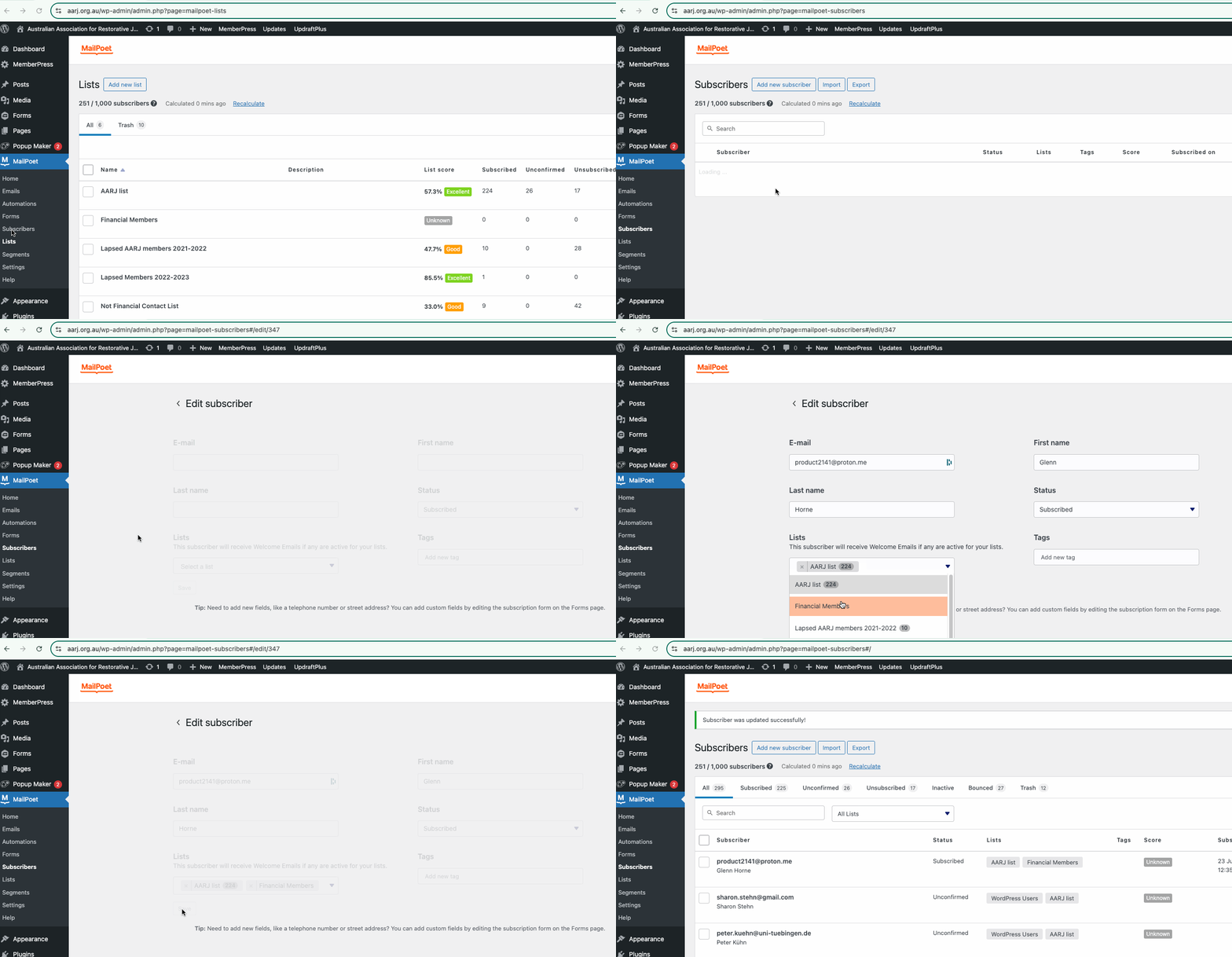
Here’s how to manage members (subscribers) and their lists. Any new paid-up member should be added to the ‘Financial Members’ list. Extra lists can be made, but I advise you to keep this as clean as possible.
The Member / Form system
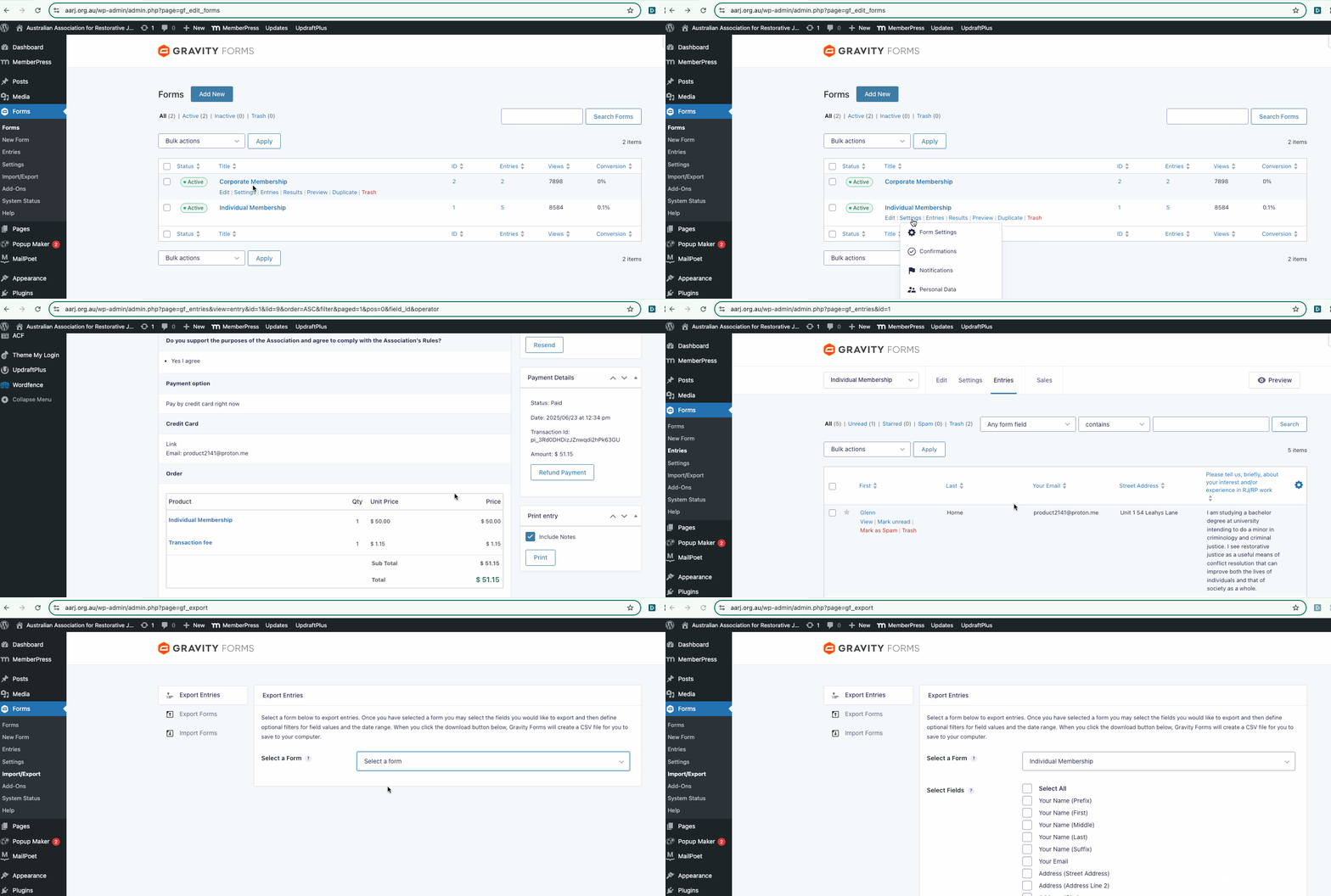
Each time a person joins or renews their membership, a simple email will be sent to them and also to admin@aarj.org.au so you’ll see all the details there. You can also check all the entries at any stage, and export any list if you wish. To do this go to Forms / (choose the relevant form) and click ‘entries’ as per this screencast.
Mailing to all members
The bulk mailing system on the AARJ site is called Mailpoet. This allows for bulk mailing. Remember that Memberpress can send individual reminders to each of your members, so you may not need to send bulk emails often. However, if you do, go to Mailpoet from the Dashboard. Then you’ll see the Emails that have been sent previously.
In general, the best technique is to hover over the last good one and click ‘duplicate’ which will (yes!) duplicate the whole newsletter, so you’ll just need to write the new message and follow the prompts to send it. Remember not to overwhelm people with mass mailouts. AARJ is bound by the anti-spam regulations of Greengraphics, Mailpoet or any other sending server, and of course the Australian and global anti-spam rules and regulations.
Cancelling a member
If someone’s membership has lapsed, the only action you should need to take is to remove them from the ‘Financial Members’ Mailpoet list (see ‘Managing Mailpoet lists’ above).
Extra stuff
Step at Greengraphics can help if you need anything. Give me a call on (03) 5472 5300 or via email any stage. I’m here to help!